Dental roll-ups protect enterprise value when IT diligence is specific, fast, and tied to an integration plan. The right assessment tells you what you are buying, how quickly you can standardize it, and the true cost to reach your enterprise stack across every clinic.
MellinTech partners with multi‑location operators that are expanding through acquisition or new builds and need consistent technology across 25, 75, or more sites. Our core work includes M&A IT due diligence and site conversions, denovo office IT planning, network design and cabling, and nationwide rollouts.
Why IT diligence matters to valuation
IT diligence determines what you are really acquiring, how fast you can integrate it, and how much risk must be priced into the deal. A focused review of security controls, backups, licensing, and connectivity reduces contingent liabilities that often surface after close.
Consider a target where imaging archives are unencrypted and no one has validated a restore in the last 12 months. That single exposure can justify a holdback, change your wave plan, and reset capital forecasts for the first 100 days. Framing these issues as DSO IT due diligence within dental M&A keeps the conversation aligned to valuation and time to integration.
What counts as an asset vs. a liability in dental settings
Use the quick tests below to separate value from risk during site walks and remote reviews.
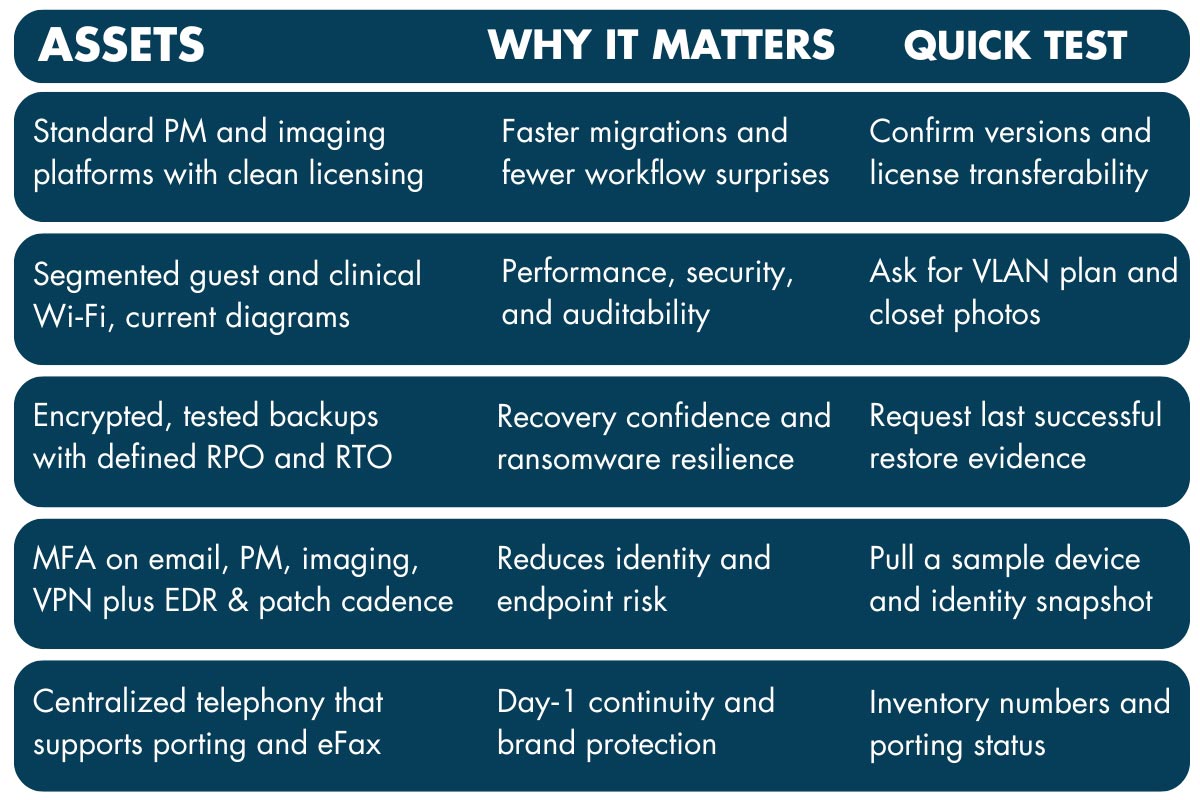
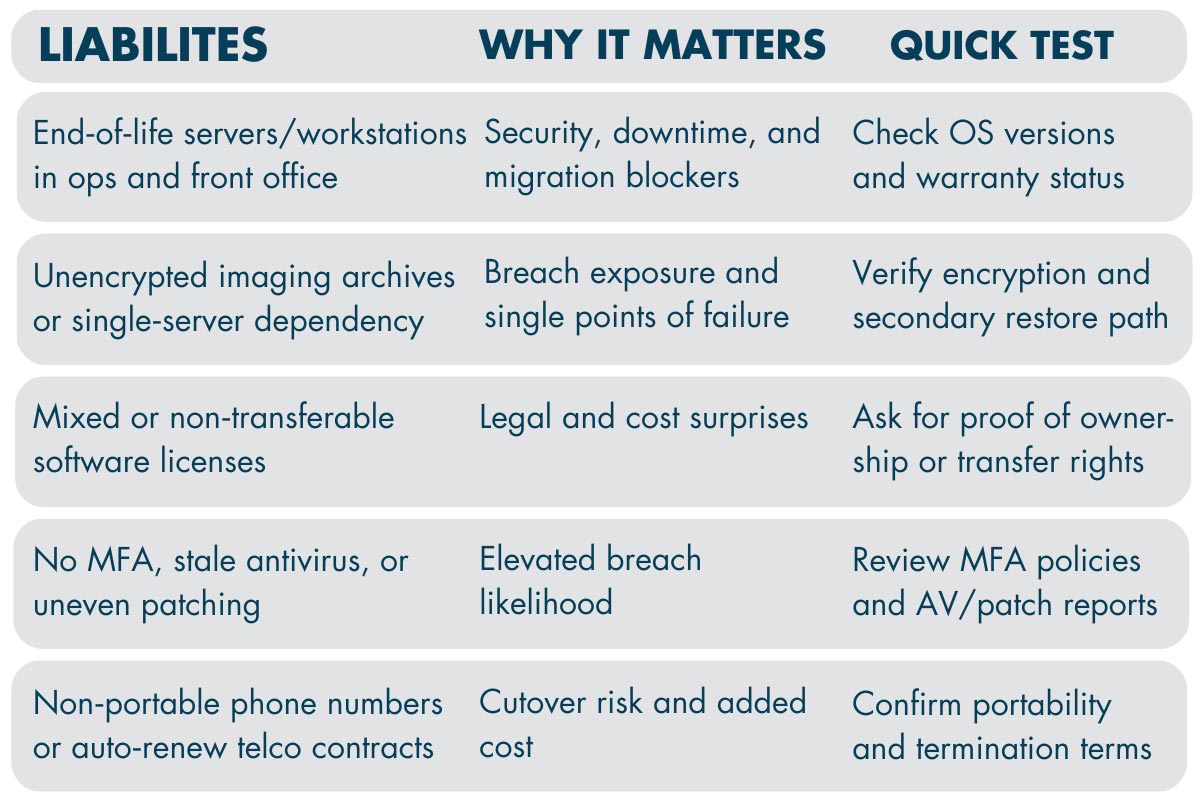
Pre-LOI due diligence timeline, 60-90 minutes
Before you open a data room, run a quick remote triage to size risk and integration friction:
• OS versions, patch status, and endpoint protection on a representative sample of devices.
• Backup posture and last known successful restore.
• MFA and identity basics for email, PM, imaging, and VPN.
• Telephony portability risk and numbers inventory.
• PM and imaging versions and known integration constraints.
• Contract snapshots for ISP, phones, imaging, and key line‑of‑business apps.
This lightweight step gives your deal team an early read on red flags and helps frame price adjustments or holdbacks if needed.
Want a quick read on your next target? Talk with MellinTech about a rapid IT assessment that highlights integration risks and red flags before you make an offer.
The 10 workstreams of dental IT due diligence
1. Applications and data
Assess the current PM and imaging suites, data quality, eRx and clearinghouse ties, and cloud versus on‑prem constraints.
What good looks like: one approved PM and imaging path with a tested migration approach.
2. Infrastructure
Inventory servers, workstations, virtualization, storage, imaging workstations, and sensor or CBCT connectivity.
What good looks like: standardized device images and refresh criteria aligned to your stack.
3. Network and cabling
Evaluate closet health, rack and power, copper and fiber runs, ISP diversity, SD‑WAN readiness, VLANs, and guest isolation.
What good looks like: a baseline design you can stamp across regions with predictable materials and labor.
4. Security
Review identity, MFA, EDR, patching, email security, least privilege, and monitoring.
What good looks like: MFA everywhere, EDR on all endpoints, and auditable admin access.
5. Backups and disaster recovery
Validate schedules, offsite copies, encryption, immutability, and restore evidence.
What good looks like: defined RPO and RTO with documented, recent restores from an immutable copy.
6. Compliance
Confirm HIPAA safeguards, BAAs, audit trails, and periodic access reviews.
What good looks like: complete BAAs for all vendors that touch PHI and searchable audit logs.
7. Telephony and contact center
Check VoIP readiness, call flows, recording, SMS compliance, eFax, and number portability.
What good looks like: an enterprise call plan with clean porting and tested eFax routes.
8. Vendors and contracts
Pull license counts, warranties, SLAs, auto‑renew dates, and termination terms.
What good looks like: clear transfer rights and no lock‑in that blocks standardization.
9. People and process
Identify who owns IT locally, current SOPs, onboarding and offboarding, change control, and training.
What good looks like: named owners and checklists that map cleanly to your enterprise model.
10. Cost and timeline modeling
Build Day‑1, Day‑30, and Day‑100 tasks with per‑site cost ranges and capital versus operating budgets.
What good looks like: a wave plan that protects chair time and hits EBITDA targets.
MellinTech’s field services and rollout playbooks align to these ten workstreams for DSOs and other multi‑site healthcare operators.
What to ask for in the data room
This is the evidence list your deal team needs to validate risk, quantify integration effort, and negotiate with confidence. Use it to speed review across IT, legal, and finance without extra back‑and‑forth.
• Hardware inventory with serials and warranty status
• Network diagrams, IP schemes, ISP bills, and contract terms
• Software license reports and proof of ownership or transfer rights
• Admin credential register and privileged access policy
• Backup reports and restore logs with dates
• Patch and EDR compliance snapshots
• BAAs, HIPAA risk assessments, and incident history
• PM and imaging versions and integration notes
• Telephony numbers, call flow diagrams, and porting readiness
Red flags that can justify price adjustments or hold backs
Not every issue is a deal breaker, but some risks materially change valuation and integration timing during DSO IT due diligence. The red flags below are the most common reasons for price adjustments or holdbacks, and the table connects each to business impact, mitigation, and the effect on your schedule and budget.
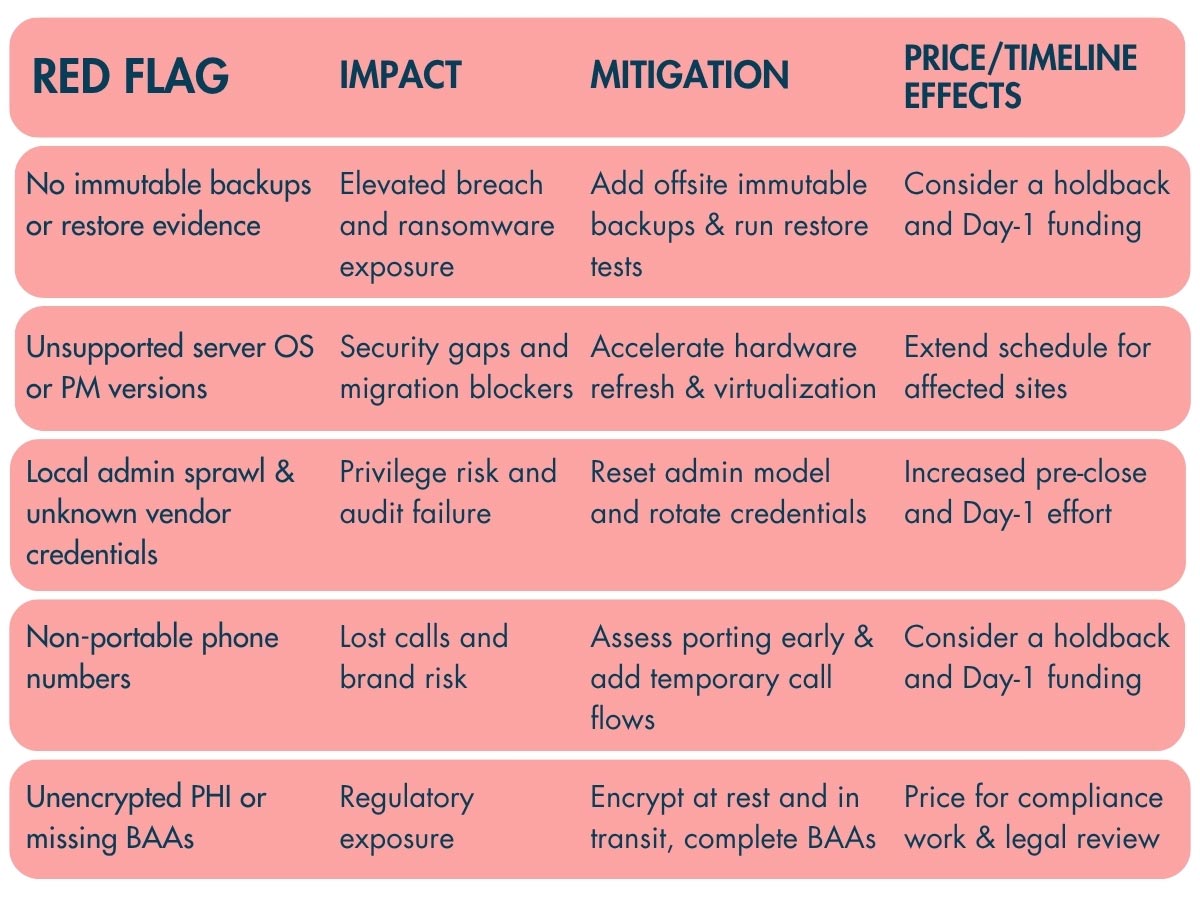
If these risks sound familiar, you don't have to navigate them alone. Connect with MellinTech to assess exposure and protect enterprise value before you close.
Integration blueprint after close
Now that you have your risk profile and the documents to back it up, turn those findings into a practical plan your leaders can point to and your teams can run. It aligns budget, staffing, and clinic schedules across locations so value shows up faster.
Day‑1: Stabilize access and protect chair time. Standardize identity with MFA, validate backups, confirm voice and eFax continuity, and run an imaging checklist before the first appointments.
Day‑30: Roll out golden device builds and the baseline network design, including segmented guest and clinical Wi‑Fi and documented closets. Begin migrating priority clinics to your standard PM and imaging stack.
Day‑100: Complete the first migration wave, enforce security baselines across all sites, and lock in your integration KPIs. MellinTech leads multi‑region deployments with M&A IT due diligence and site conversions, network design and cabling, DeNovo planning, and nationwide rollouts.
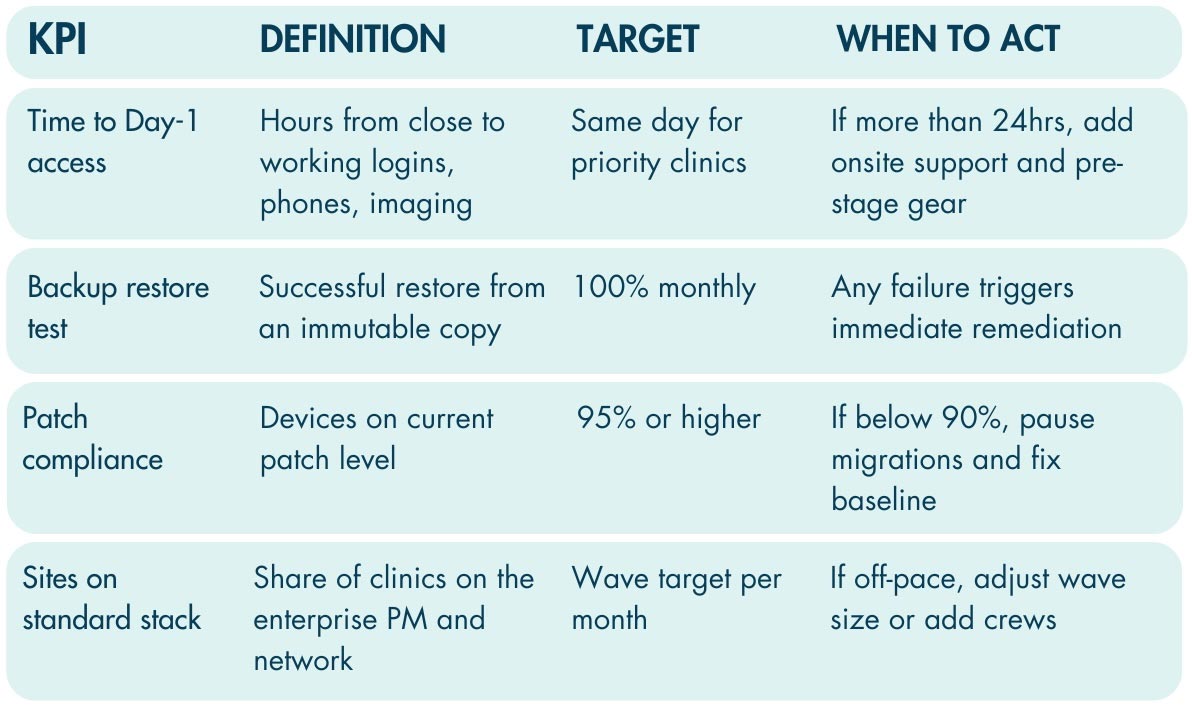
KPI scorecard
Measure what integration looks like in practice. Track time to Day‑1 access, the percentage of sites on your standard stack, backup success and tested restores, and patch compliance. Use thresholds to trigger action.
Frequently asked questions
What is a reasonable per-site cost to reach the standard stack?
It varies by starting point and what you standardize. Model a range with the main drivers listed in your diligence notes, such as cabling rework, device refresh, imaging workstation standards, and telephony cutover effort.
Can we keep Open Dental, Dentrix, or Eaglesoft at acquired sites?
You can, but fragmentation increases support burden and slows enterprise reporting. Many DSOs migrate to one standard with a staged approach that protects chair time and preserves clinical workflow.
How do we minimize downtime on cutover day?
Freeze changes, pre‑stage gear, test restores and logins, validate imaging and eRx on a checklist, and staff onsite support during the first appointments of the day.
How do we evaluate HIPAA compliance during MAA
Validate BAAs, encryption, access audits, backups, and incident history. Confirm that PHI access is logged and that restore tests are documented so audit readiness is clear.
Who owns what after close?
Define enterprise ownership for identity, patching, backups, and telephony. Assign local champions for daily workflows and escalation, then publish a simple RACI.
Call to action
Schedule a 60‑minute pre‑LOI IT risk screen. You will receive a risk summary, a prioritized Day‑1 to Day‑30 action list, and a per‑site integration estimate aligned to your standard stack. This offer is built for DSOs and other multi‑site healthcare groups executing regional rollouts.