Imagine a typical Tuesday morning at one of your high-volume dental practices. The waiting room is full, hygienists are turning over operatories, and a localized anesthetic has just been administered in Op 3.
Now, imagine the network drops.
The digital X-rays won’t load. The practice management software freezes. The front desk can’t process the payment for the patient walking out the door. In a corporate office, a network outage is an annoyance; in a healthcare environment, it is a critical failure of patient care.
For CTOs and CIOs of DSOs and multi-location healthcare groups, the mandate is often contradictory: Upgrade our aging infrastructure to support modern imaging and cloud workflows, but do not interrupt the revenue stream.
You cannot simply hit "pause" on a clinic to fix the Wi-Fi. This is the delicate art of the live site IT upgrade. It requires more than just technical knowledge; it requires surgical precision and logistics that border on military strategy.
At MellinTech, we have managed rollouts for hundreds of locations simultaneously. We know that the success of a project isn't measured by the speed of the switch, but by the invisibility of the work. Here is how to plan a live upgrade that keeps your technology moving forward without stopping your patient flow.
Phase 1: The Site Strategy (The "No Surprises" Rule)
The number one reason live upgrades fail is a lack of visibility. You cannot rely on the blueprints from the landlord or the documentation left by the previous MSP (Managed Service Provider).
In the world of M&A and rapid expansion, we often open an MDF (Main Distribution Frame) only to find what we affectionately call "spaghetti closets": a decade of patch cables woven into a knot, resting on a shelf next to a cleaning bucket.
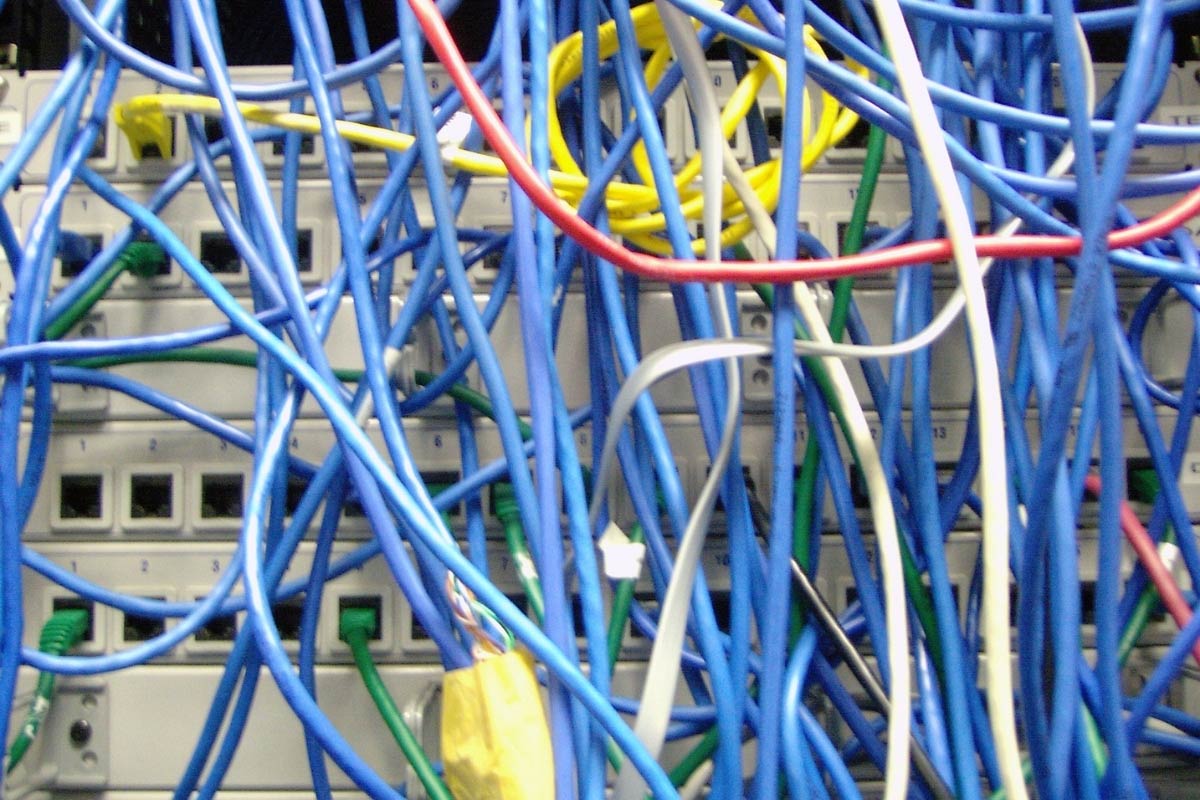
Before you schedule a single technician for the install, you must conduct a comprehensive site audit. A live site IT upgrade is not the time for discovery; it is the time for execution.
Your audit must confirm:
Cabling Integrity: Is the existing Cat5e viable, or do you need to rip and replace to Cat6 to support new bandwidth requirements?
Physical Constraints: Is there actual rack space? Is there adequate cooling? We have seen servers overheat in closets shared with water heaters.
Power Availability: Are there enough outlets for the new UPS and switches, or do we need an electrician before the IT team arrives
The MellinTech Standard: We don't guess. We put boots on the ground to map the reality of the site, ensuring the "Day One" plan is based on facts, not assumptions.
Phase 2: Staging and Phasing the Rollout
Attempting a "Big Bang" switch-over, where you replace everything at once, is a recipe for disaster in a live environment. Instead, treat the upgrade like a heart transplant: keep the blood pumping while you change the parts.
A successful live site IT upgrade relies on "Shadow Hours" and "Zone Defense."
The Shadow Hour Strategy
While night and weekend shifts are the safest bet for minimizing disruption, they are expensive and often difficult to staff nationwide. A better approach is often parallel infrastructure. We stage the new stack (firewalls, switches, WAPs) alongside the old one. We configure, tag, and test the new gear while the old gear runs the clinic. The actual downtime is reduced to the seconds it takes to move patch cables from the old switch to the new one.

Zone Defense
Don't upgrade the whole building at once. Break the floor plan into zones:
Zone 1 (Low Risk): Back offices, break rooms, and administrative areas. Do these first to test stability.
Zone 2 (Medium Risk): Front desk and reception. Schedule this during the lunch hour dip.
Zone 3 (High Risk): Operatories and Imaging rooms. These are touched only when patient flow is zero, or done one by one to allow the clinic to operate at 90% capacity rather than 0%.
Phase 3: The Pilot Site (Proof of Concept)
If you are planning a rollout for 50+ locations, never start the mass deployment without a Pilot. However, do not pick your flagship location for the pilot.
Choose a location that represents your "average" site, perhaps one with slightly older wiring or a tight server closet. You want the pilot to expose problems, not hide them.
Use the pilot to build your timeline metrics:
How long did it actually take to tone and tag the unmarked wall ports?
Did the mounting brackets for the new WAPs fit the existing drop ceiling tiles?
How long did the cloud config take to push to the local device?
If the pilot reveals that a site takes 6 hours instead of the estimated 4, you can adjust your nationwide schedule before you have technicians sitting idle and billing overages across three time zones.
Is your internal team stretched too thin for a pilot? MellinTech acts as your flex capacity.
Phase 4: Communication (The Human Layer)
As a CTO, you focus on the stack. But the success of a live site IT upgrade often depends on the Office Manager.
The clinical staff doesn't care about your SD-WAN architecture; they care about whether they can pull up a patient's chart. If a technician walks in unannounced with a ladder, you have already lost the office's trust.
The Communication Protocol:
T-Minus 1 Week: Notify the Site Manager of the schedule and scope.
-
T-Minus 48 Hours: Reconfirm access codes and arrival times.
-
The "Cheat Sheet": Provide a simple, one-page document for the on-site staff. It should explain what is happening, how long the internet might flicker, and exactly who to talk to if something looks wrong.

We find that when clinical staff feels informed, they become partners in the upgrade rather than obstacles.
Phase 5: The "Day One" Standard
The upgrade isn't finished when the lights on the switch turn green. It is finished when the documentation is uploaded.
In the rush of a live environment, it is tempting to zip-tie a bundle of cables and leave. But sloppy closeouts lead to expensive service calls three months later.
Demand Validation:
Visual Proof: Photos of the rack (front and back), the WAP mounting, and the clean workspace.
Data Validation: Wireless heat maps post-install to prove coverage in the far corners of the building.
Speed Tests: Hardwired speed tests from the operatory workstations to ensure the imaging software won’t lag.
At MellinTech, we don't clear a ticket until we have visual and data-driven proof that the site is fully operational and the documentation is updated in your central portal.
Invisible Tech
The ultimate compliment for an IT team is silence.
If we perform a live site IT upgrade correctly, the doctor shouldn't notice us. They should simply notice that their X-rays are loading faster and the Wi-Fi stopped dropping in the corner operatory.
Your internal IT team is likely already stretched thin managing help desk tickets and strategic initiatives. They don't have the bandwidth to manage the logistics of 50 concurrent site upgrades. That is where we fill the gap.
MellinTech provides the flex capacity and the field expertise to handle the heavy lifting of nationwide rollouts. We handle the noise so you can focus on the signal.
Is your organization planning a refresh or a new rollout?
Let’s discuss how we can execute your vision without disrupting your operations.